
A content hub is a central page or section that organizes related content around one main topic and connects those pieces through clear internal links. If you are asking what is a content hub, the simplest answer is that it helps readers explore a subject more easily and helps search engines understand how your content fits together. At SEONetwork, this question often comes up when teams publish many useful articles but still struggle with weak structure, scattered topic coverage, and unclear internal linking.
A strong content hub does not just collect articles in one place. It creates a clearer relationship between the main topic and the supporting content around it. That structure is what makes a content hub useful in SEO rather than just visually neat.
What Is a Content Hub?
To understand the concept clearly, it helps to separate a content hub from a regular content archive. A content hub is built around topic relationships, not just publishing order. Its job is to connect content with purpose.
A Simple Definition
A content hub is a central content destination built around one broad topic. It usually includes a main page that introduces the topic and links to supporting pages covering related subtopics in more depth.
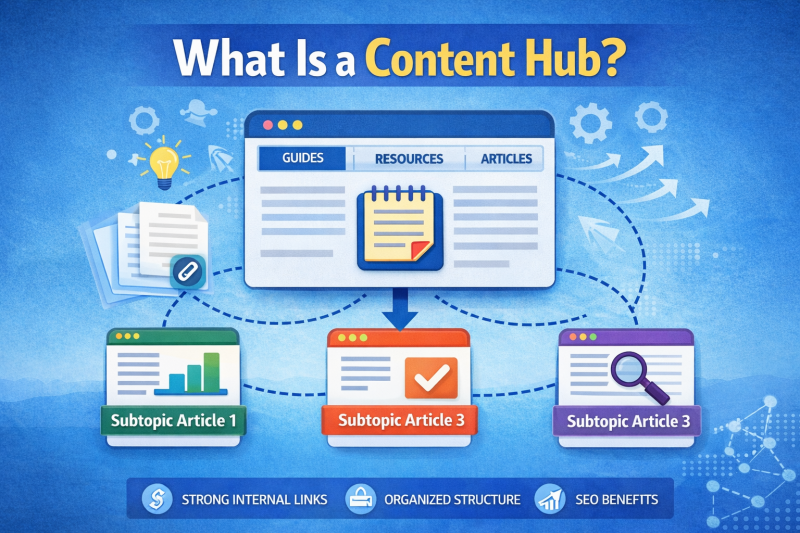
In practice, the hub acts as a structured entry point. Instead of leaving readers to search through unrelated articles, it gives them a more direct path through a topic area.
The Basic Structure Of A Content Hub
Most content hubs include one main hub page and several linked supporting pages. The main page typically introduces the topic, frames the subject, and guides the reader toward related content based on interest or need.
The supporting pages then expand on narrower questions or subtopics. Together, the hub and its connected pages form a more organized content system rather than a loose collection of articles.
How Users And Search Engines Interact With It
For users, a content hub makes exploration easier. It reduces friction by showing how different pieces of content connect, which can improve navigation and keep readers moving through related information.
For search engines, that same structure provides stronger contextual signals. A well-built hub makes it easier to understand what the central topic is, how the supporting pages relate to it, and why the overall group of content matters.
>>> EXPLORE FURTHER: Buy Backlinks, Buy Guest Posts & Backlink Services | SEONetwork
What Makes A Content Hub Different From A Regular Blog?
Many websites already publish articles around similar subjects, but that alone does not make them content hubs. The difference usually comes down to structure, clarity, and how intentionally the content is connected.
Centralized Topic Organization
A regular blog often grows over time based on publishing needs, trends, or keyword opportunities. That can produce useful content, but it may also create overlap, scattered coverage, and uneven topic depth.
A content hub organizes those pieces around a defined center. Instead of letting related articles sit apart from one another, it brings them into a clearer topic framework.
Connected Supporting Content
A blog can contain many good posts without those posts forming a meaningful system. In a content hub, the supporting content is not just related in theme. It is intentionally connected to the main topic and to the broader structure around it.
That connection matters because it creates continuity. Readers can move from overview to detail more naturally, and the topic becomes easier to follow as a whole.
A Clearer Internal Linking System
Internal links inside a content hub are usually more deliberate than the links in a standard blog setup. The hub page links to supporting content, and supporting pages often link back to the hub or to each other where it makes sense.
This creates stronger pathways through the content. It also gives the site a more readable structure from both a user and SEO perspective.
Why Do Content Hubs Matter For SEO?
The value of a content hub in SEO comes from how it improves context, discoverability, and content relationships. It is not just about having more pages on a topic. It is about making those pages work together more effectively.
They Strengthen Topical Relevance
Topical relevance becomes easier to build when related pages sit within a clear content structure. A content hub tells search engines what the main subject is and shows how the supporting pages add depth around that subject.
This can help the site appear more focused and better organized. It also reduces the chance that closely related pages compete with one another without a clear hierarchy.
They Improve Content Discoverability
Important content often gets buried on large websites, especially when posts are published over time without a clear system. A hub helps surface those pages by linking them through a visible topic-based structure.

That improves discoverability for readers and creates stronger pathways to content that might otherwise be harder to find. In content hub SEO, this is one of the practical reasons hubs often outperform disconnected blog collections.
They Support A Better Site Structure
A strong site structure is not only about menus and categories. It is also about how knowledge is grouped and connected across the site.
Content hubs contribute to that structure by giving the site clearer topic clusters. When done well, they make the website easier to understand, easier to navigate, and more coherent in the eyes of search engines.
>>> EXPLORE FURTHER: How to Do SEO Optimization: A Step-by-Step Guide
Content Hub Vs Content Pillar: What Is The Difference?
These two terms are often used in similar conversations, so confusion is common. They do overlap, but they are not always identical. The easiest way to understand the difference is to look at how each one functions.
Where The Two Concepts Overlap
Both content hubs and content pillars are built to organize content around a core subject. Both rely on internal linking, topic relationships, and a stronger content structure.
Because of that overlap, people sometimes use the terms interchangeably. In many cases, they are talking about very similar content strategies.
How Their Roles Differ In Practice
A content pillar usually refers to a central page that covers a broad topic and connects to supporting pieces. A content hub is often the broader structure or destination that contains and organizes those related pieces.
In other words, a pillar can be part of a content hub. The pillar may serve as the main overview page, while the hub includes the wider group of connected resources around that topic.
When To Use One Structure Or Both
Some websites use a pillar-style page as the heart of a hub. Others use a more flexible hub design that functions like a resource center without following a strict pillar format.
For content hubs for SEO, the more useful question is not which label is better. The better question is whether the structure helps users understand the topic and helps search engines interpret the relationships between pages.
How To Create A Content Hub
When people search how to create a content hub, they usually want the logic behind the structure rather than a technical setup lesson. The core idea is to choose the right topic, group related content clearly, and create a central place that connects everything with purpose.
Choose A Core Topic
A good content hub starts with one topic broad enough to support multiple subtopics but focused enough to stay coherent. If the subject is too broad, the hub can become vague. If it is too narrow, it may not support enough meaningful related content.
The best hub topics usually sit above a set of connected search questions. They are large enough to support depth, but still clear enough to organize effectively.
Map Related Subtopics
Once the central topic is defined, the next step is to identify the supporting subtopics around it. These should reflect real questions, related concepts, or connected areas of interest that naturally belong under the main theme.
This is where structure starts to matter. A good hub is not built from random keywords. It is built from related content that expands the topic in a logical way.
Build The Main Hub Page
The main hub page should act as an entry point, not just a list of links. It needs to explain the core topic clearly, create context for the reader, and guide people toward the most relevant supporting content.
That main page does not need to contain every answer in full detail. Its job is to frame the topic well and create a meaningful pathway into the rest of the content.
Connect Supporting Pages With Internal Links
Internal linking is what turns a topic collection into a real content hub. The supporting pages should connect back to the hub when relevant, and they may also connect to each other if those relationships help the reader.
This structure improves navigation and reinforces the logic of the topic group. It also creates a clearer internal framework for search engines to interpret.
Common Mistakes When Building Content Hubs For SEO
A content hub can look impressive on the surface and still fail structurally. The most common problems usually come from weak topic choices, poor connections between pages, or a lack of real hierarchy.
Focusing On Keywords Without Structure
Some websites build around keyword lists rather than a real topic system. That can produce pages that rank for individual terms but do not work together as a coherent hub.
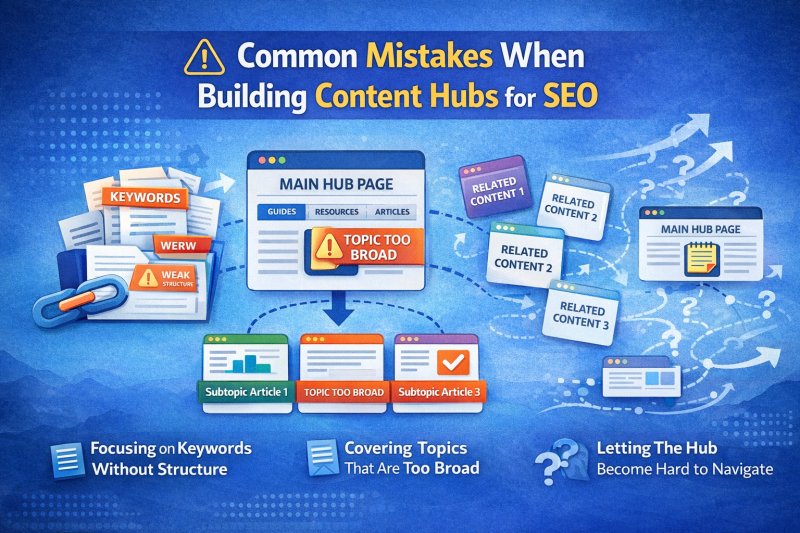
A strong hub needs more than keyword relevance. It needs clear relationships between pages and a central topic that makes sense as a whole.
Covering Topics That Are Too Broad
If the topic is too large, the hub becomes hard to define and harder to navigate. Broad subjects often lead to shallow sections, inconsistent subtopics, and a weak overall structure.
A more focused hub usually creates a better experience because the relationships between pages stay clearer and more useful.
Publishing Related Content Without Clear Connections
A site may publish several articles on similar themes and still fall short of a true hub if those articles are not clearly connected. Shared topic language alone is not enough.
Without a visible structure, the content remains fragmented. Readers may miss important pages, and search engines may struggle to interpret the full topic relationship.
Letting The Hub Become Hard To Navigate
A content hub should simplify exploration, not make it more confusing. If the hub page becomes overloaded, poorly grouped, or hard to scan, it loses much of its value.
The best hubs balance depth with clarity. They help readers move through the topic without feeling lost in too many disconnected options.
What Are Some Examples Of Content Hubs?
The format of a content hub can vary depending on the type of website. The common thread is that each example gives readers a central topic entry point and a clear path into supporting content.
An Educational SEO Hub
An SEO education website might create a content hub around technical SEO. The hub page could introduce the subject and connect to pages about crawling, indexation, canonical tags, structured data, and site speed.
This works well because the topic is broad enough to support multiple important subtopics while still feeling tightly connected.
A Service-Focused Hub
A service website might build a hub around local SEO, content strategy, or on-page SEO. The main page would explain the broader subject, while supporting pages would explore the individual components related to that service area.
This type of hub can help combine educational value with clearer topic organization. It also gives the website a stronger content structure around commercially relevant themes.
A Blog Resource Center
Some websites use a blog resource center as a content hub. Instead of displaying all posts in reverse chronological order, they organize related articles by topic and create a stronger central page that connects the content.
This is often one of the most practical ways to turn an existing blog into a more useful hub without changing the entire site structure.
FAQ About Content Hubs
This topic often creates follow-up questions because the term is used in different ways across SEO and content strategy discussions. The answers below clarify the most common points of confusion.
Is A Content Hub The Same As A Pillar Page?
Not exactly. A pillar page is often one central page covering a broad subject, while a content hub is usually the wider structure that connects related content around that subject. In some cases, a pillar page sits at the center of a content hub.
How Many Pages Should A Content Hub Have?
There is no fixed number. A small hub may work well with a handful of high-quality supporting pages, while a larger hub may grow into a much deeper resource over time. What matters more is the logic of the structure and the relevance of the supporting content.
Can Small Websites Build Content Hubs?
Yes. A small website does not need a large content library to build a useful hub. Even a modest set of well-connected pages can create a clearer topic structure and improve how content is understood.
Do Content Hubs Help Long-Term SEO Growth?
They can, especially when a website wants to build stronger topic coverage over time. A content hub creates a clearer foundation for internal linking, content expansion, and a more organized site structure, which supports long-term SEO development.
A content hub is valuable because it turns related content into a clearer system rather than a loose archive. When the structure is strong, the topic becomes easier to follow, easier to expand, and easier for search engines to interpret.
>>> YOU MAY ALSO LIKE:
- What Is a Content Pillar? A Simple Guide to Pillar Content in SEO
- What Is Cornerstone Content? Definition, SEO Role, and How to Use It

I’m Jackson Avery, and I have 5 years of experience in content SEO. At SEONetwork, I share practical SEO knowledge, insights, and content strategies to help readers better understand search intent, content optimization, and sustainable organic growth.